Research that depends on government data faces a timing problem. Agencies release updated datasets on their own schedules. Miss a release and the analysis uses stale numbers. Check too often and the task becomes tedious busywork that crowds out actual research.
This case study walks through building a Claude Code skill called /ca-data-watch that monitors five California health economics data portals. The goal is catching new data releases without manual checking.
The Manual Workflow
The baseline approach involves visiting each data portal periodically. For California health economics research, the relevant sources include:
- HCAI (Healthcare Access and Information): Hospital financial data, patient discharge records
- DHCS (Department of Health Care Services): Medi-Cal enrollment, managed care data
- State Controller: County expenditure reports
- DOF (Department of Finance): Population estimates
- EDD (Employment Development Department): County employment and unemployment
Each source has a different update schedule. DHCS publishes monthly Medi-Cal enrollment figures. The State Controller releases annual county data in February. DOF publishes population estimates in May. Keeping track of when to check which source requires a calendar, a checklist, or a good memory.
The manual process looks like this:
- Open each data portal in a browser
- Navigate to the relevant dataset page
- Look for "last updated" text or file dates
- Compare against memory of what was there before
- Note if anything changed
- Repeat weekly or monthly
Time: 15-30 minutes per check, assuming nothing distracts along the way. More often, the check gets postponed until a specific analysis needs the data.
What a Monitoring Skill Needs
Automating this requires three capabilities:
- Navigate to each data portal and extract update indicators
- Compare the current state against a tracking file
- Report which sources have new data
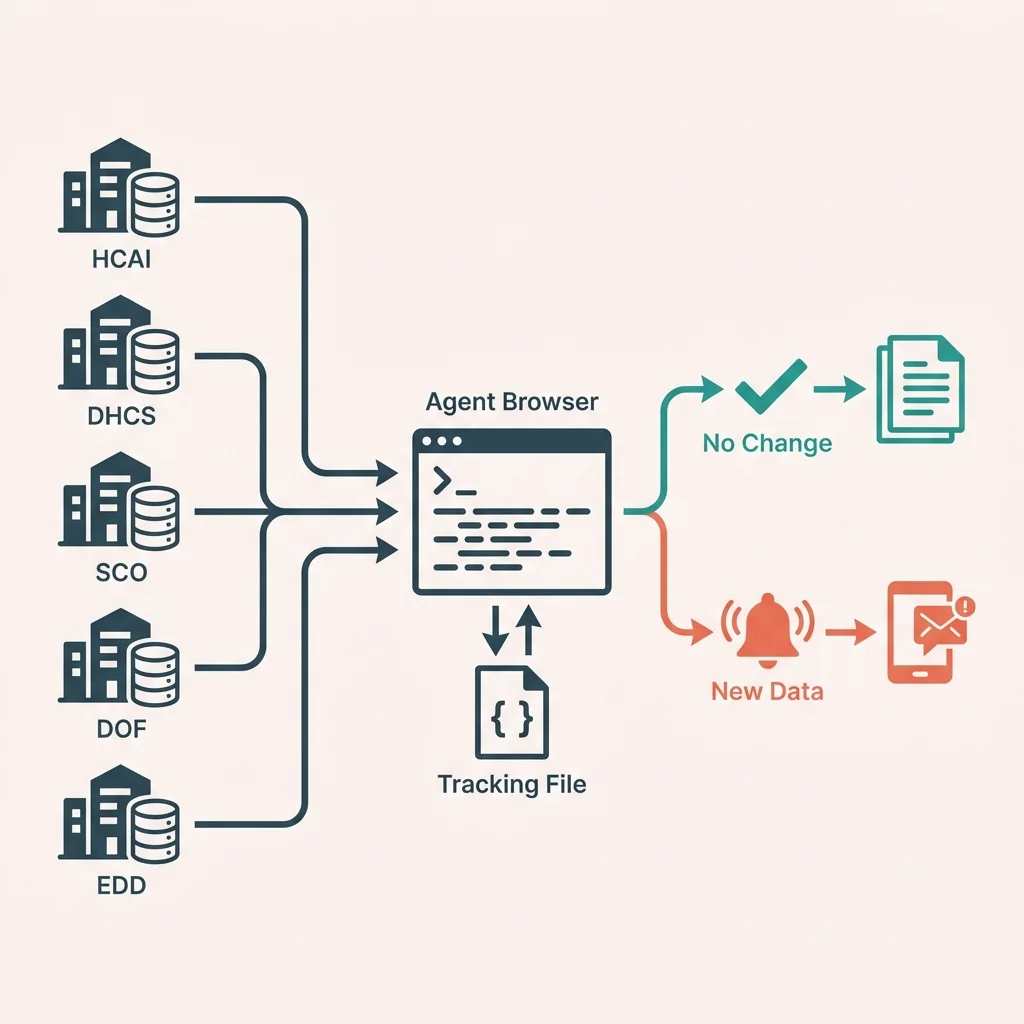
The first part needs browser automation. Government data portals are not designed for programmatic access. Some have APIs; most do not. The practical approach is loading the page like a human would and extracting the relevant information.
Agent Browser provides this capability. It loads pages in a real browser, making it harder for sites to detect automation. The accessibility tree extraction gives structured access to page content without fragile CSS selectors.
The Tracking File
Before checking for updates, the system needs to know what "updated" means. This requires storing the last-known state of each data source.
A JSON tracking file holds this information:
{
  "sources": {
    "hcai": {
      "name": "Healthcare Access and Information",
      "url": "https://hcai.ca.gov/data-and-reports/",
      "last_checked": "2026-01-31",
      "last_known_update": "2024-Q3",
      "datasets": [
        {
          "name": "Hospital Financial Data",
          "last_known_date": "2023"
        }
      ]
    }
  }
}
Each source entry includes:
- The URL to check
- When it was last checked
- The most recent update that was found
- Specific datasets with their individual update dates
The skill compares what it finds on the page against these stored values. A discrepancy means new data.
Source-Specific Extraction
Each data portal presents update information differently. The skill needs source-specific logic.
HCAI
HCAI publishes quarterly hospital data. The page at hcai.ca.gov/data-and-reports lists datasets with their coverage periods. Hospital financial data might show "Data through 2023" while patient discharge data shows "Data through Q3 2024."
Extraction approach: Load the page, find text patterns like "Data through [date]" or "Last updated [date]" in the accessibility tree.
DHCS / CHHS Open Data
DHCS data lives on the California Health and Human Services Open Data Portal at data.chhs.ca.gov. This platform shows modification dates for each dataset.
Extraction approach: Navigate to the specific dataset page, extract the "Modified" date from the metadata section.
State Controller
The State Controller publishes county financial data at sco.ca.gov/ard_local_data.html. The fiscal year appears in dataset titles: "Counties Annual Report FY 2022-23."
Extraction approach: Load the page, find fiscal year references in dataset titles.
DOF Population Estimates
DOF publishes E-4 population estimates with the year in the filename and page title: "E-4 Population Estimates for 2024."
Extraction approach: Load the estimates page, extract the year from the title or file links.
EDD Labor Market
EDD publishes monthly employment data. The reference month appears in data tables and page headers: "Employment Data for November 2024."
Extraction approach: Load the employment page, extract the reference month from table headers or page content.
The Check Process
When invoked, the skill runs through this sequence:
For each source in tracking file:
  1. Load the source URL with Agent Browser
  2. Extract update indicators from page content
  3. Compare against last_known_update
  4. If different:
     - Flag as new data
     - Store new value
  5. Update last_checked timestamp
  6. Continue to next source
The output groups sources by status:
CA Data Watch - February 1, 2026

[HCAI] Healthcare Access and Information
  Status: ✅ No new updates
  Last known: 2024-Q3

[DHCS] Medi-Cal Data
  Status: 🆕 NEW DATA DETECTED
  Last known: December 2025
  Current: January 2026

[SCO] State Controller
  Status: ⏳ Annual update expected February
  Last known: FY 2023-24

Summary: 1 new update, 3 unchanged, 1 pending
Handling Update Schedules
Some sources follow predictable schedules. The State Controller releases annual data in February. DOF publishes population estimates in May. The skill can flag when an expected update is approaching:
{
  "sco": {
    "update_frequency": "annual",
    "expected_update_month": 2
  }
}
In February, the check for SCO might show:
[SCO] State Controller
  Status: ⏳ Annual update expected this month
  Last known: FY 2023-24
This prompts closer attention during the expected release window.
Error Handling
Government websites occasionally go down for maintenance, change their structure, or add aggressive bot protection. The skill handles these gracefully:
- Page load failure: Log the error, mark as "Check failed," continue with other sources
- Structure change: If expected patterns are not found, mark as "Manual check needed"
- Cloudflare protection: Use headed mode, add delays, accept occasional CAPTCHA interruptions
The goal is degrading gracefully rather than failing completely. One problematic source should not block checking the others.
Report Generation
For weekly research reviews, the --report flag generates a markdown file:
# CA Data Watch Report

**Date:** February 1, 2026
**Sources Checked:** 5
**New Updates:** 1

## Summary

| Source | Status | Last Known | Current |
|--------|--------|------------|---------|
| HCAI | ✅ Current | 2024-Q3 | 2024-Q3 |
| DHCS | 🆕 New | Dec 2025 | Jan 2026 |

## New Data Available

### DHCS Medi-Cal Enrollment (January 2026)

New monthly enrollment figures now available.
URL: data.chhs.ca.gov/dataset/medi-cal-monthly-enrollment
The report provides a record of data availability for project documentation.
What This Changes
The manual workflow required remembering to check, knowing where to look, and recognizing when something was new. The automated workflow handles the mechanical parts:
Before: "I should check if new Medi-Cal data is out... let me open the portal... where is the enrollment dataset... what month was it last time..."
After: /ca-data-watch → "DHCS has January 2026 data."
The time savings compound over a research project. Catching a data release the week it happens instead of months later can change analysis timelines.
Extending the Source List
The tracking file makes adding new sources straightforward. A researcher studying housing might add:
{
  "hcd": {
    "name": "Housing and Community Development",
    "url": "https://www.hcd.ca.gov/data/",
    "update_frequency": "varies",
    "last_known_update": "2024",
    "datasets": [
      {
        "name": "Annual Progress Reports",
        "last_known_date": "2023"
      }
    ]
  }
}
The skill then includes HCD in the regular check cycle.
Conclusion
Monitoring government data portals involves predictable, repetitive work that is easy to skip when deadlines press. Building a skill for this task converts the chore into a single command. The automation catches new releases regardless of whether there is time for manual checking.
The command /ca-data-watch now does in seconds what used to take 15-30 minutes and consistent discipline. More importantly, it happens reliably instead of being postponed until the data is actually needed.
Suggested Citation
Cholette, V. (2026, February 1). Monitoring government data portals. Too Early To Say. https://tooearlytosay.com/research/methodology/data-portal-monitoring/Copy citation