The Blank Slate
We had a productive session yesterday. Claude Code understood our difference-in-differences identification strategy, knew why we chose to cluster standard errors at the county level, remembered that the 2019 observations were dropped due to the policy change mid-year, and helped us interpret three robustness checks with perfect awareness of our research design.
Then we close the terminal.
This morning, we open a fresh session. "Let's continue working on the parallel trends analysis," we type.
"I don't have any context about a parallel trends analysis. Could we start by describing the research project?"
The AI asks questions we already answered. It suggests control variables we explicitly rejected yesterday. It doesn't know that we prefer explicit coefficient interpretation over marginal effects. It doesn't remember that the county-level clustering was a deliberate choice after consulting the Abadie et al. (2023) paper on clustering decisions.
This is not a malfunction. This is expected behavior.
Understanding why this happens transforms our relationship with AI-assisted development. Once we stop fighting the memory limitation and start working with it, everything changes.
How AI Memory Works (And Does Not)
With the whiteboard in mind, let us understand what is happening technically.
The AI has what computer scientists call a "context window." Think of this as the whiteboard itself. It is the AI's short-term memory, its working memory for our conversation. The context window holds everything from our current session: our questions, the AI's responses, the files we have asked it to read, the regression output we have discussed.
The context window has a fixed size. Just like our whiteboard has physical edges, the AI's memory has limits. It cannot hold infinite information.
When we close a session, the context window empties completely. The AI retains nothing. The next session begins fresh, as if we had never spoken before.
This differs from our other research tools. Stata preserves our do-files. Python saves our scripts. Our reference manager remembers our citations. We expect our tools to remember. The AI does not work this way.
Why? The AI generates responses by pattern-matching based on what is currently in its context window. The model has no mechanism to store our session and retrieve it later. Each conversation exists in isolation.
The Whiteboard Analogy
Before diving into how AI memory works, let us establish an analogy that will guide our understanding.
Imagine we have a large whiteboard in our office. It is a substantial whiteboard with plenty of space, but it has edges. It cannot hold infinite information.
At the start of each day, the whiteboard is completely blank. As we work, we fill it up. We write our research question in the corner. We sketch out the identification strategy. We jot down variable definitions, sample restrictions, the list of control variables we debated. Every piece of information takes up space on this whiteboard.
The whiteboard represents how the AI holds information during a conversation. Everything the AI "knows" about our current analysis is written on this whiteboard.
Here is the crucial part: when we leave the office for the day, a cleaning crew comes in and wipes the entire whiteboard clean. The next morning, we start with a pristine blank surface. Nothing from yesterday remains.
This is exactly how AI memory works. The whiteboard gets completely erased between sessions.
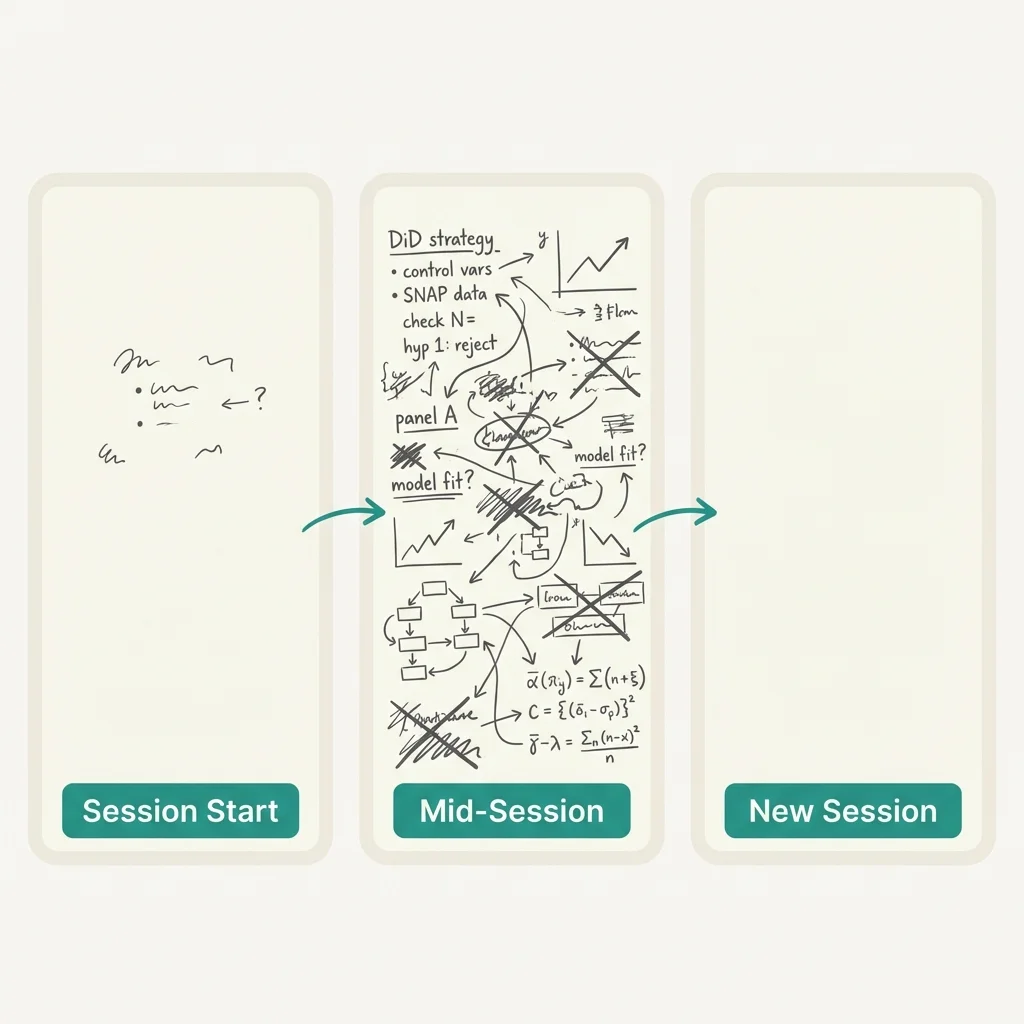
What Happens When the Whiteboard Fills Up
Our whiteboard is big, but not infinite. What happens during a long working session when we fill it up?
When the context window reaches its limit, the AI starts forgetting earlier parts of our conversation. Imagine the whiteboard getting full, and we have to erase old notes on the left side to make room for new notes on the right side. The most recent information stays visible, but older content disappears.
Computer scientists call this "context compression." For our purposes, it simply means the AI gradually loses track of things we discussed earlier in a long session. That careful explanation of our instrumental variables strategy from an hour ago? It may have been erased to make room for the robustness check discussion we are having now.
This happens within a single session. We do not even need to close the terminal to experience memory loss. A sufficiently long conversation will fill the whiteboard and force older information to be erased.
The takeaway: even during a session, the AI's memory is not permanent.
Why This Matters for Our Research
Single-session tasks work fine. If we can complete an analysis from start to finish within one session, the memory limitation barely affects us. We explain the context, do the work, and move on.
But real research projects span many sessions. We work on a SNAP (Supplemental Nutrition Assistance Program) benefits analysis for months. Decisions made in Week 1 about sample restrictions need to inform robustness checks in Week 12. Identification strategy choices have implications for every subsequent specification. Variable construction should remain consistent across dozens of regressions.
Without memory, the AI cannot accumulate knowledge about our project. It cannot learn our research preferences over time. It cannot remember why we dropped observations from counties with population under 10,000 three weeks ago.
This creates what we might call the "re-explanation tax." Every session, we pay a cost in time and mental energy to rebuild the AI's understanding of our context. Some days this tax is small. Other days, when we're working on something complex that depends on a lot of prior decisions, the tax can consume half our session just getting Claude up to speed.
The productivity cost compounds. If every session starts from zero, we cannot build momentum across sessions. We cannot say "remember the control variable specification we settled on for the food security regressions? Let's use the same approach here." We have to re-explain the control variable logic every time we want to apply it.
Signs We're Fighting the Memory Problem
How do we know if the memory limitation is hurting our workflow? Here are the symptoms:
We start every session with a long explanation. If the first ten minutes of every session involve pasting in our identification strategy and data cleaning decisions, we're paying the re-explanation tax heavily.
The AI re-suggests things we already tried. "Have we considered including state fixed effects?" Yes, Claude, we discussed this yesterday. That approach fails for our use case because the policy variation is entirely at the state level. But the AI has no memory of that conversation.
We feel like we're training it from scratch each time. By the end of yesterday's session, Claude understood our research design intimately. It made suggestions that fit perfectly with our identification strategy. Today? It's making generic suggestions that ignore the specific threats to validity we've already addressed.
Sessions feel repetitive instead of progressive. Good collaboration should feel like building on previous progress. If every session feels like starting over, we're not building anything; we're just repeating.
We avoid complex analyses because setup takes too long. The most sophisticated AI-assisted research requires deep context: the literature we're engaging, the data quirks we've discovered, the reviewer comments we're addressing. If rebuilding that context is too expensive, we simply don't attempt certain tasks. The memory limitation shrinks what we're willing to try.
If any of these symptoms sound familiar, we're experiencing the full cost of context reset. The good news is that techniques exist to dramatically reduce this cost, even though we cannot eliminate the underlying limitation.
Preview of Solutions
The memory limitation is fundamental. We cannot make Claude remember previous sessions. But we can warm-start each session so that it begins with relevant context already in place.
The key insight is this: even though the AI's context window resets, our filesystem does not. Files persist. What if we could store the most important context in a file, and have Claude read that file at the start of every session?
This is exactly what the CLAUDE.md file does. It's a context document that lives in our project directory. When we start a session, Claude can read this file and immediately understand our research design, data sources, variable definitions, and current state. We document once, and that documentation persists across sessions.
Beyond CLAUDE.md, session hygiene practices help us capture important context before it disappears. At the end of a productive session, we take a few minutes to document what the AI learned. This turns ephemeral session knowledge into persistent documentation.
Context budgeting treats our context window as a finite resource, which it is. Instead of carelessly filling the whiteboard with irrelevant information, we deliberately choose what goes in and what stays out. This extends how long we can work before context compression degrades our session.
These practices don't give the AI memory. Nothing can do that within the current architecture. But they warm-start each session with the context that matters most, dramatically reducing the re-explanation tax.
The Intermediate tier of this series covers these practices in depth. For now, understanding the problem is the foundation for understanding the solutions.
Living With the Limitation
Accepting that sessions reset is the first step toward productive AI collaboration.
Fighting the limitation feels intuitive. We want to complain that the AI "should" remember. We want to treat it like a human colleague who maintains continuity. But anthropomorphizing the AI leads to frustration. It is not forgetting in the human sense. It simply has no mechanism for session-to-session persistence.
Once we accept this, we can build practices that work with the limitation instead of against it. We document context externally. We structure our work into session-sized chunks. We develop systems for warm-starting each session quickly.
Interestingly, the reset has advantages too. A fresh session carries no accumulated confusion. If our previous conversation went down an unproductive path with our instrumental variables strategy, today's session doesn't inherit that wrong turn. The blank slate is genuinely blank, which means we can approach the same identification problem from a different angle without the AI stubbornly clinging to yesterday's failed approach.
Thinking in terms of sessions rather than continuous work changes how we plan. A good session has a clear goal, makes measurable progress, and captures anything important before it ends. The reset becomes a natural boundary for our work, not an interruption.
The most productive Claude Code users don't wish for persistent memory. They design their workflows around the absence of it. They treat each session as self-contained but connected to a larger research project through external documentation. They accept the tax of context rebuilding and minimize it through smart practices.
This is the mindset shift that unlocks serious productivity. The AI is a powerful tool with a specific limitation. Understanding that limitation, rather than fighting it, is how we get the most out of the partnership.
Practical Exercises
These exercises help us experience and understand the context reset firsthand.
1. Experience the reset. Work on a regression specification for fifteen or twenty minutes. Close the session. Reopen Claude Code and try: "Continue where we left off." Observe what happens. The AI has no idea which control variables we were debating. This is the limitation, demonstrated.
2. Measure the cost. In a fresh session, time how long it takes to get Claude to a useful understanding of our research project. Compare this to how quickly we were working at the end of yesterday's session. The difference is our re-explanation tax.
3. Identify repeated patterns. Over our next three or four sessions, keep a note of which explanations we give repeatedly. "We're using a difference-in-differences design." "The treatment is SNAP expansion in 2014." "We cluster standard errors at the county level." These repeated explanations are candidates for documentation.
4. Write it down. Before closing our next productive session, write down three things Claude "knows" that we'll need to re-teach tomorrow. This is the beginning of thinking about external context storage.
5. Prepare for Intermediate tier. Identify the project where context loss hurts us most. This is where we'll apply CLAUDE.md when we reach the Intermediate articles. Having a real project in mind makes the practices concrete.
Key Takeaways
- The context window is the AI's short-term memory, its working memory for our conversation. It holds everything from our current session but has a fixed size.
- When the context window fills up, older content gets erased to make room for new content. Think of a whiteboard that gets full: we have to erase old notes to make room for new ones.
- When we close a session, the context window empties completely. The AI retains nothing from previous sessions. Every session starts with a blank slate.
- The re-explanation tax is the time and energy we spend rebuilding context each session. For complex research projects, this tax can be substantial.
- The blank slate also has advantages. A fresh session carries no accumulated confusion and allows us to approach problems from new angles.
- This limitation is normal and manageable. Practical techniques like CLAUDE.md dramatically reduce the time needed to get the AI up to speed each session.
Suggested Citation
Cholette, V. (2026, February 11). Why it forgot everything: Understanding context. Too Early To Say. https://tooearlytosay.com/research/methodology/understanding-context/Copy citation