Claude Code Guide - Advanced Tier
Article 4 of 5
This article is part of our advanced series on building personal AI infrastructure. The advanced tier covers agents, skills, hooks, and integrations—the building blocks that transform Claude Code from a helpful assistant into an integrated research environment.
Prerequisites:
- Spawning Agents: When to Delegate
- Creating Skills: Reusable Workflows
- Hooks: Automation Without Asking
We should also be comfortable with the Intermediate tier fundamentals: CLAUDE.md context files, session hygiene, and context budgeting.
What We Will Learn
By default, Claude Code works with files on our computer. But what if we want to pull data from FRED (Federal Reserve Economic Data), search Google Scholar, or add citations to Zotero, all without leaving Claude? We can connect Claude to these outside services. Once connected, we can ask Claude to fetch unemployment data or find papers, and it handles the details.
By the end of this article, we will know how to set up these connections and use them in our research workflow.
Claude Code works brilliantly with files and terminal commands. But our actual research involves more: economic data, citation managers, literature databases, government statistics. Every time we switch to a browser tab to check FRED or search Google Scholar, we break our flow.
This is where connecting to outside services changes everything. These connections bring external data sources into our AI workflow, turning context switches into natural conversation.
What Does "Connecting to Outside Services" Mean?
Think about how we normally get FRED data. We open a browser, navigate to the FRED website, search for a series like UNRATE, and download the data. Then we go back to our analysis. Each step pulls us out of our work.
Now imagine asking Claude directly: "Pull the seasonally adjusted unemployment rate for the last 12 months." Claude queries FRED and returns the time series, all without us leaving the conversation.
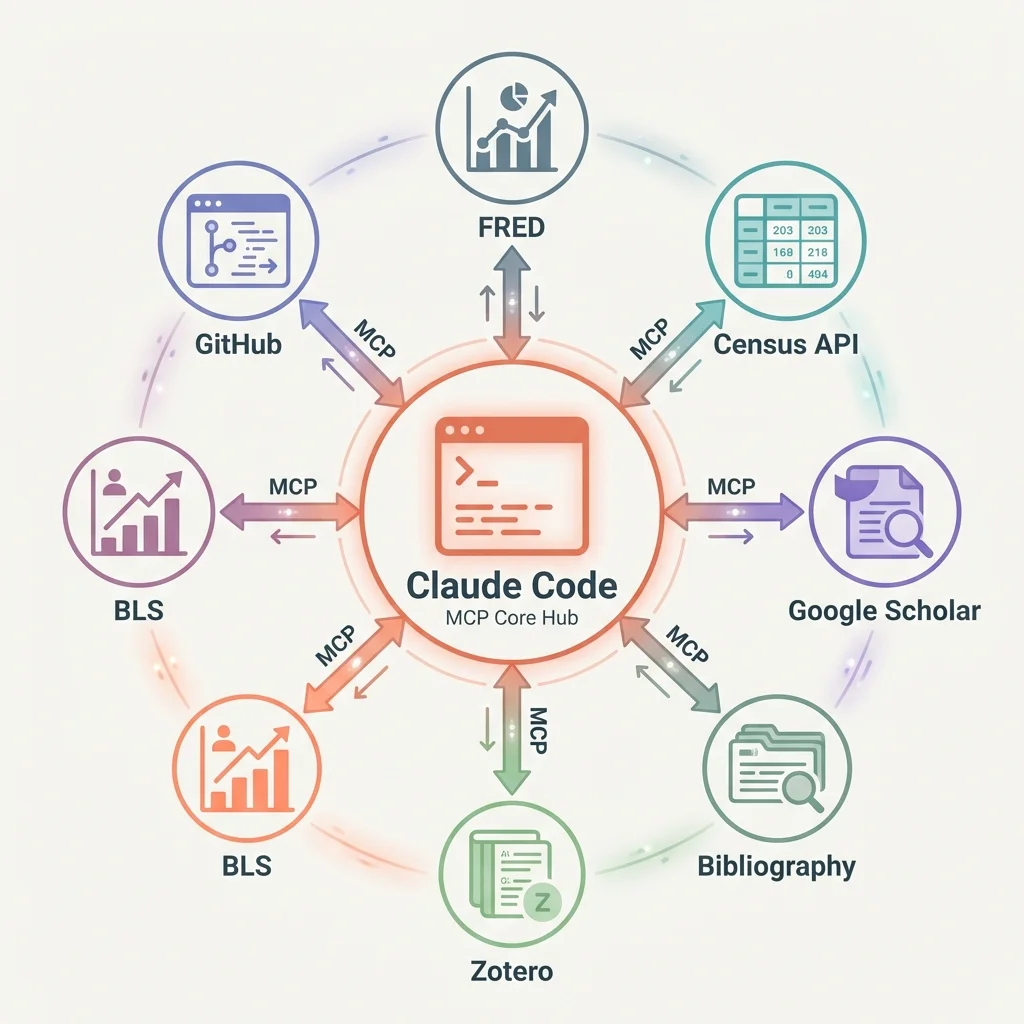
That is what these connections do. They let Claude talk directly to services like FRED, Census, Google Scholar, and Zotero. From our perspective, we just ask questions and get answers. The technical details, authentication, formatting, error handling, all happen behind the scenes.
Here is the practical difference:
Without connections to outside services:
"Pull the latest unemployment rate from FRED."
Opens browser. Navigates to FRED. Searches for UNRATE. Copies data. Returns to terminal.
With connections:
"Pull the seasonally adjusted unemployment rate for the last 12 months."
Claude queries FRED directly and returns the time series.
Why does this matter? Because integrated workflows compound. When we can pull economic data, search for citations, and check BLS (Bureau of Labor Statistics) statistics without leaving our conversation, we think differently. Problems that seemed like separate tasks become connected observations.
What Services Can We Connect?
The number of available connections is growing rapidly. Here are the categories that matter most for applied economics research:
Economic Data
- FRED: GDP, unemployment, inflation, interest rates, 800,000+ time series
- Bureau of Labor Statistics: employment, wages, CPI, productivity data
- Census: ACS microdata, decennial census, economic surveys
Literature and Citations
- Google Scholar: paper searches, citation counts, related work discovery
- Zotero: reference management, bibliography generation, PDF retrieval
- Semantic Scholar: academic paper metadata, citation graphs
Government Statistics
- Census Bureau: American Community Survey, population estimates
- BEA: national accounts, regional economic data
- IPUMS: harmonized census and survey data
Data Visualization
- Chart generation: line, bar, scatter, sankey diagrams
- Automated figure creation for working papers
Development Tools
- GitHub: code repositories, issue tracking, collaboration
- Chrome DevTools: web scraping verification, data source inspection
The list keeps growing. Community-built connections cover databases and specialized data sources. Any data source we use regularly likely has a connection already built (or in progress).
Setting Up a Connection
Setting up a connection involves three steps: installation, setup, and verification.
Let us walk through adding a connection to FRED as an example.
Step 1: Understand Where Configuration Lives
Like skills and hooks, MCP server connections can be project-local or global:
- Project-local:
.mcp.jsonin the project folder. Use for project-specific data sources. - Global:
~/.claude/settings.jsonin our home folder (add anmcpServerssection). Use for services we access from any project.
FRED, Census, and Google Scholar are typically global since we access them from multiple research projects. A specialized internal database might be project-local.
Step 2: Installation
Connections install as small programs that run alongside Claude Code. Many are available through npm (a package manager) and start automatically when Claude Code launches.
Step 3: Setup
The setup file tells Claude Code which service to connect to and how to log in. Here is a complete example for a project-local configuration:
// File: .mcp.json (in project root)

{
  "mcpServers": {
    "fred": {
      "command": "npx",
      "args": ["-y", "@anthropic/fred-mcp-server"],
      "env": {
        "FRED_API_KEY": "your-api-key-here"
      }
    }
  }
}
Notice the login credentials go in environment variables. Never save credentials directly in settings files that might be shared; use environment variables or a secure credential store. FRED credentials are free but required.
Step 3: Verification
Once set up, we can verify the connection is working:
"List available FRED tools."
Claude should show us options like get_series, search_series, get_release_dates. If we see these, the connection is working.
Troubleshooting Common Issues
When things fail, check these in order:
- Login credentials - Are the credentials valid? Do they have the required permissions?
- Network - Can our computer reach the external service?
- Settings format - JSON files are unforgiving about commas and quotes
- Connection process - Is the connection program actually running?
Most problems are credential issues. Test the credentials independently before debugging the connection.
Finding What a Service Can Do
Once services are connected, we need to find out what they can do. Claude has a search function that helps us discover available capabilities.
Direct Selection
When we know exactly what we need:
"Select the FRED tool for fetching time series data."
This loads the specific capability and makes it available for use.
Keyword Search
When we are exploring what is possible:
"Search for tools related to economic data."
This returns matching capabilities across all connected services, ranked by relevance.
Understanding What Information We Need to Provide
Each capability requires specific information. For example, the FRED series tool might need:
series_id: The FRED identifier (e.g., UNRATE, GDP, CPIAUCSL)start_date: Beginning of date rangefrequency: Data frequency (monthly, quarterly, annual)
Reading documentation before using a capability saves frustration. Information that seems optional is often required for meaningful results.
Example: Discovering Census Capabilities
Say we need ACS data but are unsure what is available:
"What Census tools are available?"
Claude might show us:
get_acs_data- Fetch American Community Survey variablessearch_variables- Find variable codes by keywordget_geography- List available geographic levelsget_estimates- Retrieve population estimates
Now we know what is possible and can construct our data pipeline.
Using Connections in Practice
Let us look at three real examples that show how these connections integrate into applied economics research workflows.
Example 1: Morning Data Check with FRED
Before starting analysis, we want to know if key series have updated:
"Check FRED for updates to UNRATE, CPIAUCSL, and GDP in the last 7 days."
Claude queries FRED and returns a summary:
FRED series status (checked Jan 30, 2026):

1. UNRATE (Unemployment Rate)
   - Last updated: Jan 28, 2026
   - Latest value: 3.8% (Dec 2025)
   - Next release: Feb 7, 2026

2. CPIAUCSL (CPI for All Urban Consumers)
   - Last updated: Jan 15, 2026
   - Latest value: 315.6 (Dec 2025)
   - Next release: Feb 12, 2026

3. GDP (Gross Domestic Product)
   - Last updated: Jan 25, 2026
   - Latest value: $28.3T (Q4 2025, advance)
   - Next release: Feb 27, 2026 (second estimate)
We can drill deeper without switching tools:
"Pull the monthly unemployment rate for 2025 and calculate the year-over-year change."
The context stays within our conversation. We can fetch the data, run calculations, and incorporate results into our analysis without ever leaving Claude Code.
Example 2: Literature Search with Google Scholar
Before writing a literature review section, we need to find relevant papers:
"Search Google Scholar for papers on difference-in-differences with staggered adoption, published 2020-2025."
Claude queries the literature database and formats the response:
Found 47 relevant papers. Top 10 by citation count:

1. Callaway & Sant'Anna (2021) - "Difference-in-Differences
   with Multiple Time Periods"
   - Journal of Econometrics, 2,847 citations
   - Key contribution: Group-time ATT estimator

2. Sun & Abraham (2021) - "Estimating Dynamic Treatment
   Effects in Event Studies"
   - Journal of Econometrics, 1,923 citations
   - Key contribution: Interaction-weighted estimator

3. Goodman-Bacon (2021) - "Difference-in-Differences with
   Variation in Treatment Timing"
   - Journal of Econometrics, 1,756 citations
   - Key contribution: Decomposition theorem

4. de Chaisemartin & D'Haultfoeuille (2020) - "Two-Way Fixed
   Effects Estimators"
   - American Economic Review, 1,412 citations
   - Key contribution: Negative weights problem
We can follow up naturally:
"Add the Callaway & Sant'Anna paper to my Zotero library and generate a BibTeX entry."
The workflow flows. Literature discovery leads to citation management leads to bibliography generation.
Example 3: Census Data Pull for Regional Analysis
We are studying income inequality across California counties:
"Pull median household income from the 2023 ACS for all California counties."
ACS 2023 5-Year Estimates: Median Household Income
California Counties (58 total)

Top 5:
1. San Mateo County: $149,907
2. Santa Clara County: $146,382
3. Marin County: $142,103
4. San Francisco County: $136,689
5. Contra Costa County: $117,203

Bottom 5:
54. Tulare County: $56,169
55. Merced County: $54,907
56. Kings County: $54,326
57. Fresno County: $53,969
58. Imperial County: $47,384

Coefficient of variation: 0.38
Range: $102,523
We can cross-reference with BLS data:
"Now pull unemployment rates for these same counties from BLS."
The tools work together because they are all accessible from the same context.
Building Our Own Connections
Sometimes the connection we need is missing. Building our own is more accessible than it sounds.
When to Build vs. Use Existing
Build our own when:
- No existing connection covers our data source
- We need to integrate internal research databases
- We want tighter control over data and credentials
- The existing connection lacks the variables we need
Use existing connections when:
- They cover our use case adequately
- They are actively maintained
- We need no customization
Basic Structure
A custom connection needs three things:
- Tool definitions - What capabilities does this connection provide?
- Tool implementations - What happens when each capability is used?
- Settings - How does it connect and authenticate?
Here is a simplified example structure for a research database connection:
// Define what capabilities we're exposing
const tools = [
  {
    name: "query_panel_data",
    description: "Query our county-year panel dataset",
    parameters: {
      variables: { type: "array", required: true },
      years: { type: "string", required: false },
      states: { type: "array", required: false }
    }
  }
];

// Run the capability
async function queryPanelData(variables, years, states) {
  // Query our research database
  const data = await researchDB.query(variables, years, states);
  return formatAsDataFrame(data);
}
The underlying framework handles the communication details. Our job is defining capabilities and implementing their logic.
Testing Custom Connections
Test in isolation before connecting to Claude Code:
- Run the connection standalone
- Send test requests to verify capabilities work
- Check credentials and error handling
- Connect to Claude Code only after unit tests pass
A broken connection creates confusing errors. Thorough testing saves debugging time.
Integration Patterns
With multiple services connected, patterns emerge for how to use them together.
The Morning Routine
Start each research day with a status check across data sources:
"Run my morning check: FRED updates, new NBER working papers, Google Scholar alerts."
This single prompt queries three services and gives us a consolidated view. Any new data or relevant papers surface immediately rather than waiting until we remember to check.
Research Workflow Integration
During active analysis:
- Pull FRED data directly into Stata or Python scripts
- Verify BLS statistics match our downloaded files
- Track Census data releases for update timing
The feedback loop tightens when we stay in context to get information.
Literature Review Integration
For writing and revision:
- Search for papers that cite a key reference
- Pull citation counts for included studies
- Generate formatted bibliographies
Connected services become data sources that feed our research process.
The Compound Effect
Each connection makes the others more valuable:
- FRED data + Census demographics = richer controls
- Google Scholar + Zotero = unified citation workflow
- BLS + FRED + Census = complete data infrastructure
The more data sources we connect, the more our AI assistant can see the full picture.
Practical Recommendations
- Start with one connection. Pick the data source we use most often and set it up first. FRED is a natural starting point for most economists. Get comfortable before adding complexity.
- Protect credentials. Keep login credentials out of settings files. Use environment variables or secure credential stores.
- Learn the capabilities. Each connection has specific capabilities with specific requirements. Time spent reading documentation saves debugging time later.
- Build workflows, not queries. Instead of individual requests, think about patterns: the morning data check, the literature search routine, the pre-submission verification.
- Consider building custom. If we are constantly wishing a capability existed for our research database, it might be worth building. The underlying framework makes custom connections approachable.
The goal: bring our most-used tools into our conversation, eliminating the context switches that fragment our research.
Next in Series
Personal AI Infrastructure: Putting It All Together - We have covered the pieces: CLAUDE.md for context, skills for workflows, hooks for automation, and connections to outside services. The final article shows how these pieces combine into a system that compounds over time.
This is Article 4 of 5 in the Claude Code Guide - Advanced Tier. The series concludes with building personal AI infrastructure that grows with our research.
Suggested Citation
Cholette, V. (2026, March 18). Connecting Claude to outside services: FRED, Census, and beyond. Too Early To Say. https://tooearlytosay.com/research/methodology/mcp-servers/Copy citation